I built a tool that let’s me talk to my journal. Actually.#
I’ve kept a journal in Obsidian for a while now. The problem was never writing things down. It was that I never read any of it again.
Entries pile up. A hard week, a small win, the same worry showing up in three different disguises across two months- all of it just sits there in a folder, unread. The whole point of journaling is supposed to be that you can look back and see something. But nobody scrolls through a year of their own late-night notes looking for patterns. I certainly didn’t.
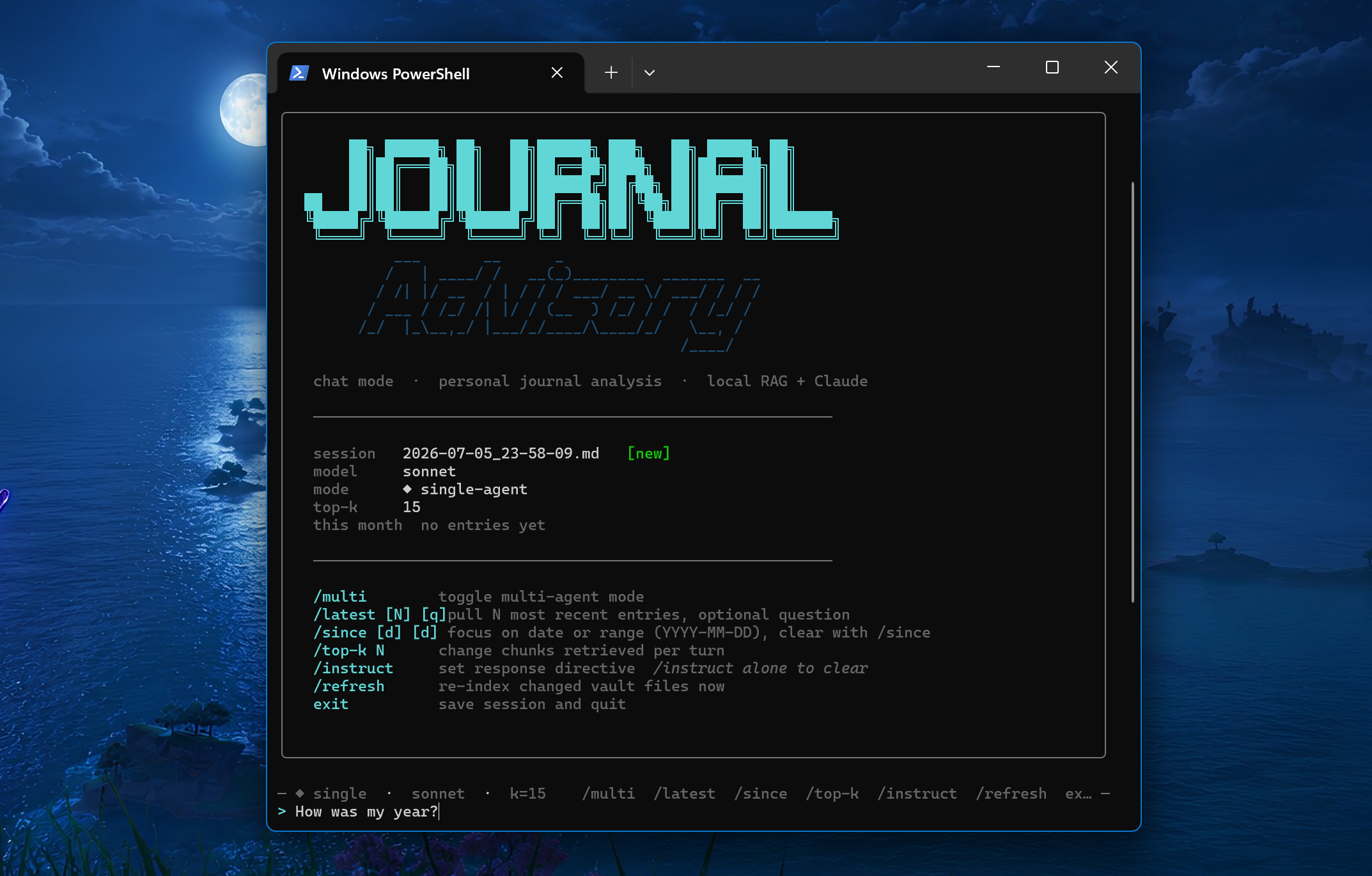
So I built something that does it for me. I call it journal-advisory. You ask it a question- what have I been stressed about lately?, how has my relationship with someone changed over time?, what were my goals at the start of the year?- and it answers using your own words. Not a horoscope, not a motivational quote. It pulls the actual entries that matter to your question and reasons over them.
The one rule I gave it: tell me the truth. Every answer is grounded in what I actually wrote. If I ask how I’ve been doing and the entries say I’ve been avoiding something, I want it to say that- not hand me a pep talk. Grounding it in real text is also what keeps it honest. It can’t speculate about my life because it only ever sees my life.
The part I cared about most: it stays on my machine#
Before I explain how it works, the thing I want to say first is that your journal is the most private thing you own, and I built this so it stays that way.
The one thing that has to leave is the very last step, handing the question and the handful of relevant excerpts to an AI to reason over. And here’s the important part: that final piece can point at any AI, including one running locally on your own machine through something like Ollama. The tool is built to be model-agnostic, so in principle nothing about your journal ever has to leave at all.
In my case my laptop just isn’t powerful enough to run a capable-enough local model, so for the time being I pointed it at Claude, which does mean that final slice (only ever the question plus the relevant excerpts, never the whole vault) goes out. Swap in a local model through Ollama and even that last step stays home; the day I’m on hardware that can run one well, that’s exactly where this goes.
How it actually works (without the jargon)#
Here’s the whole idea in plain terms.
When you set it up, the tool reads through your vault and builds a little local search index of everything you’ve written. When you ask a question, it doesn’t just keyword-match- it finds the entries that are actually about what you asked, even if you phrased it completely differently than you did back when you wrote them. Ask about feeling stuck and it’ll surface the entry where you wrote “I keep spinning my wheels,” without you ever using the word “stuck.”
On top of that, it leans slightly toward recent entries. If a theme showed up last week and also two years ago, last week probably matters more to how you’re doing now. So recency gets a thumb on the scale- not enough to drown out an important old entry, just enough to keep the answers grounded in the present.
Then it takes those entries, wraps them up with your question, and lets the model reason over them. That’s it. Find what’s relevant, weight it sensibly, answer from it.
Chat mode: where it actually gets useful#
One-shot questions are fine, but the tool comes alive in chat mode, which is where I spend most of my time. You start it with journal chat and just… talk to your own journal.
What makes it different from a normal chatbot is what happens on every single turn. Most chat tools load some context once and then ride on it for the rest of the conversation, slowly drifting away from anything real. This one re-reads your vault fresh on every message. So a conversation can wander naturally- I might start with “how’s my sleep been,” drift into “is that connected to how stressed I’ve been about exams,” then land on “okay what actually changed in April”- and each of those questions pulls its own relevant entries. The context follows the conversation instead of the conversation being stuck with whatever it grabbed at the start.
And it remembers the thread. The full back-and-forth carries forward, so it can connect what you said three messages ago to what you’re asking now, while still going back to the source text each time. Every session gets saved as a plain Markdown file, so a conversation I had with my journal in March is itself something I can read back later. You can resume old sessions, pick up the most recent one automatically, or start fresh.
There’s also a small thing I use constantly: you can hand it a directive mid-conversation. Tell it to stop softening its language, or to focus on patterns across time instead of individual events, or to just not bring up work- and it’ll respect that for the rest of the session without changing which entries it pulls. It shapes how it talks to you, separately from what it’s looking at.
Multi-Agent Mode: Three critics instead of one#
The feature I’m quietly proudest of: instead of one voice answering, you can run three at once.
- A therapist looks for the emotional patterns and the things you’re deflecting.
- A life advisor compares what you say you want against where your time and energy actually go.
- And a critic goes looking for the blind spots- the self-deceptions, the stuff you don’t want to hear.
Then a fourth pass weaves all three into a single answer.
Reading your own year through three different lenses at the same time is a genuinely strange experience. The critic in particular has said things to me, in my own words, that I’d been carefully not saying to myself.
That’s the gist#
That’s the tool. It reads what I already wrote, keeps it private, and tells me the truth about it. It turned a folder full of notes I never opened into something I actually talk to.
If you want the deeper details- the setup, the knobs you can tune, the full list of modes- it’s all in the repository: github.com/ItsMat78/journal-advisory.